
Export attachments in bulk
Export many Dynamics GP document attachments to disk in a single batch.
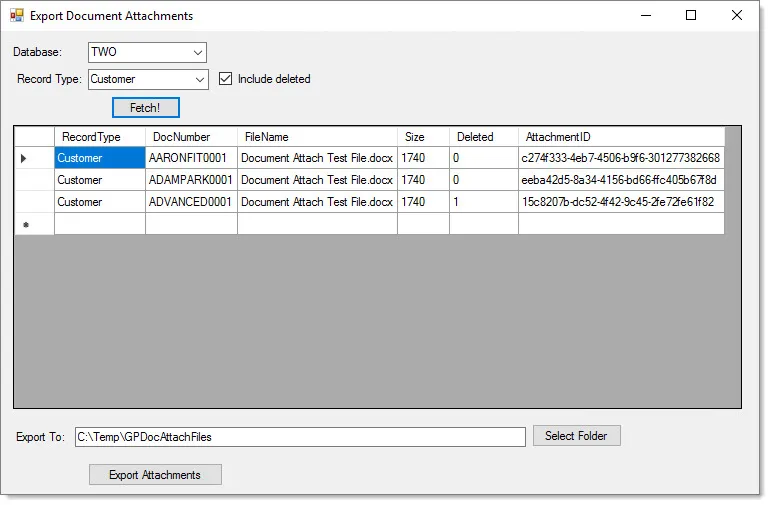
When you need to get document attachments out of Dynamics GP in bulk — to archive them, migrate them, or move them to SharePoint or Business Central — there is no built-in way to do it. This free utility fills that gap.
Pick a database and record type, decide whether to include deleted attachments, review what will be exported, and write the files to disk. It is a focused tool, so test it in a non-production environment first.
Dynamics GP stores document attachments in the database, and there is no built-in way to pull them all out at once — for example, when archiving, migrating, or moving attachments to another system.
Bulk Export Document Attachments lets you select a database and record type, choose whether to include deleted attachments, review the attachment details, and export the files to disk in one batch. It can also prepare attachments for the EFOQUS SharePoint Connector for Business Central.
Export many Dynamics GP document attachments to disk in a single batch.
Select a database and record type, and choose whether to include deleted attachments.
See attachment details — type, record number, filename, and file size — before you export.
Exports files to disk with organized file naming.
Supports the EFOQUS SharePoint Connector for Business Central.
Record types are configurable through the application's .exe.config file.
Free to download and use.
Choose the database and record type, and indicate whether deleted attachments should be exported.
Review the attachment list — type, record number, filename, and file size — then export the files to disk.
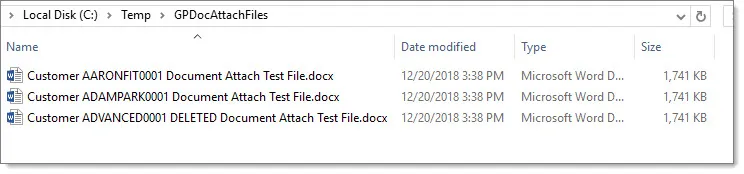
Supported: Dynamics GP 2016 through 18.x.
Free to download and use. Links open in a new tab.
Yes. Bulk Export Document Attachments is free to download and use.
It is a focused utility, not a full commercial product. It does the bulk export job with limited configuration and error handling, so test it in a non-production environment first.
Yes. Record types are configurable through the application's .exe.config file.
Dynamics GP 2016 through 18.x.